Instructions
Find easy to follow instructions
SVG filter
The svg filter effects in this template are summarized in this page.
<!-- SVG filter untuk efek pixelation -->
<svg width="0" height="0" style="position:absolute">
  <defs>
    <filter id="pixelOverlay">
      <feGaussianBlur in="SourceGraphic" stdDeviation="3" result="blur" />
      <feMorphology in="blur" operator="dilate" radius="12" result="pixelated" />
      <feComposite in="pixelated" in2="SourceGraphic" operator="in" />
    </filter>
  </defs>
</svg>

<svg width="0" height="0">
  <defs>
    <filter id="pixelateFilter" x="0" y="0" width="100%" height="100%">
      <feMorphology in="SourceGraphic" operator="dilate" radius="8" result="PIXEL" />
      <feComposite in="PIXEL" in2="SourceGraphic" operator="in" />
    </filter>
  </defs>
</svg>
GSAP guide
All GSAP animations used in this template are collected here. On this page, you’ll find guidance on how to locate and edit them. Each code block comes with extra notes to make it easier to understand.
You can find the code in the Embed Code inside this template.
<-- LIBRARY PACKAGE -->
<script src="https://cdn.jsdelivr.net/npm/gsap@3.13.0/dist/gsap.min.js"></script>
<script src="https://cdn.jsdelivr.net/npm/gsap@3.13.0/dist/ScrollTrigger.min.js"></script>
<script src="https://unpkg.com/lenis@1.3.1/dist/lenis.min.js"></script>
<script src="https://cdn.jsdelivr.net/npm/gsap@3.13.0/dist/SplitText.min.js"></script>
<script src="https://cdn.jsdelivr.net/npm/gsap@3/dist/InertiaPlugin.min.js"></script>
<script src="https://cdn.jsdelivr.net/npm/gsap@3.13.0/dist/Draggable.min.js"></script>// =========================================
// HERO SECTION — STANDALONE ANIMATIONS
// =========================================
// ----------------------------
// HERO HEADING (chars random blur)
// ----------------------------
(function () {
const headingEls = document.querySelectorAll(".text-heading-hero , .wrapper-text-registered");
const trigger = document.querySelector(".wrapper-hero");
if (!headingEls.length || !trigger) return;
headingEls.forEach(el => {
el.style.whiteSpace = "pre";
const split = new SplitText(el, { type: "chars" });
gsap.set(split.chars, {
opacity: 0,
filter: "blur(10px)",
});
const animate = () => {
gsap.to(split.chars, {
opacity: 1,
filter: "blur(0px)",
duration: 1.6,
ease: "power4.out",
stagger: { each: 0.045, from: "random" }
});
};
// Webflow-safe load trigger
window.Webflow ||= [];
window.Webflow.push(() => {
gsap.delayedCall(0.3, animate);
});
});
})();
// =========================================
// HERO DESCRIPTION — SCROLLTRIGGER VERSION
// =========================================
(function () {
const descriptionHero = document.querySelectorAll(".description-hero");
if (!descriptionHero.length) return;
descriptionHero.forEach(el => {
Object.assign(el.style, {
whiteSpace: "pre-wrap",
display: "block",
overflow: "hidden",
opacity: "1"
});
// Tunggu sedikit agar layout fix
setTimeout(() => {
const split = new SplitText(el, { type: "lines" });
// Initial state
gsap.set(split.lines, {
opacity: 0,
y: 80,
filter: "blur(8px)"
});
// Animasi masuk
const animateLines = () => {
gsap.to(split.lines, {
opacity: 1,
y: 0,
filter: "blur(0px)",
ease: "power3.out",
duration: 1.4,
stagger: 0.12
});
};
// ScrollTrigger — trigger dan target sama
ScrollTrigger.create({
trigger: el,
start: "top 90%",
once: true,
onEnter: animateLines
});
}, 200);
});
})();
For some sections, the GSAP animation script uses a modular method — combining a single animation for multiple sections at once, giving you more flexibility to modify it.
// =========================================
// GLOBAL SECTION ANIMATIONS (Scroll Based)
// =========================================
(function () {

  // =========================================
  // HELPER FUNCTION — TEXT REVEAL (PER CHAR)
  // =========================================
  const TextReveal = (() => {
    function createSplit(el) {
      el.style.whiteSpace = "pre";
      return new SplitText(el, { type: "chars" });
    }

    function animateSplit(split, trigger, options = {}) {
      const {
        duration = 1.4,
        stagger = 0.045,
        ease = "back.out(2)",
        blurStart = 10,
        start = "top 70%",
        once = true,
        delay = 0,
        markers = false
      } = options;

      gsap.set(split.chars, {
        opacity: 0,
        filter: `blur(${blurStart}px)`,
        yPercent: 25,
      });

      const animate = () => {
        gsap.to(split.chars, {
          opacity: 1,
          yPercent: 0,
          filter: "blur(0px)",
          duration,
          ease,
          stagger: { each: stagger, from: "random" },
          delay
        });
      };

      ScrollTrigger.create({
        trigger,
        start,
        once,
        onEnter: animate,
        markers
      });
    }

    function init(selector, triggerEl, options = {}) {
      const elements = document.querySelectorAll(selector);
      const trigger = document.querySelector(triggerEl);
      if (!elements.length || !trigger) return;

      elements.forEach(el => {
        const split = createSplit(el);
        animateSplit(split, trigger, options);
      });
    }

    return { init };
  })();


  // =========================================
  // HELPER FUNCTION — TEXT REVEAL (PER LINE)
  // =========================================
  function textLineReveal(selector, triggerEl, options = {}) {
    const texts = document.querySelectorAll(selector);
    const trigger = document.querySelector(triggerEl);
    if (!texts.length || !trigger) return;

    texts.forEach(el => {
      Object.assign(el.style, {
        whiteSpace: "pre-wrap",
        display: "block",
        overflow: "hidden",
        opacity: "1"
      });

      setTimeout(() => {
        const split = new SplitText(el, { type: "lines" });

        gsap.set(split.lines, {
          opacity: 0,
          y: 80,
          filter: "blur(8px)"
        });

        const animateLines = () => {
          gsap.to(split.lines, {
            opacity: 1,
            y: 0,
            filter: "blur(0px)",
            ease: "power3.out",
            duration: 1.4,
            stagger: 0.12
          });
        };

        ScrollTrigger.create({
          trigger,
          start: options.start || "top 70%", // default start
          once: true,
          onEnter: animateLines,
          markers: options.markers || false
        });
      }, 100);
    });
  }


  // ===================================================
  // START: ABOUT SECTION ANIMATION
  // ===================================================
  // Catatan: section About dimulai lebih awal (top 85%)
  textLineReveal(".descriptions-about", ".wrapper-about", {
    start: "center center",
    markers: false
  });
  // ===================================================
  // END: ABOUT SECTION ANIMATION
  // ===================================================


  // ===================================================
  // START: SERVICE SECTION ANIMATION
  // ===================================================
  TextReveal.init(".text-heading-service-v2", ".wrapper-service-v2", {
    duration: 1.4,
    ease: "back.out(2)",
    markers: false
  });

  textLineReveal(".descriptions-heading-service-v2", ".wrapper-service-v2", {
    markers: false
  });
  // ===================================================
  // END: SERVICE SECTION ANIMATION
  // ===================================================


  // ===================================================
  // START: TEAM SECTION ANIMATION
  // ===================================================
  textLineReveal(".descriptions-team", ".wrapper-team", {
    markers: false
  });
  // ===================================================
  // END: TEAM SECTION ANIMATION
  // ===================================================


  // ===================================================
  // START: CTA SECTION ANIMATION
  // ===================================================
  TextReveal.init(".text-heading-cta", ".wrapper-cta", {
    duration: 1.5,
    ease: "power4.out",
    markers: false
  });

  textLineReveal(".text-tag-cta", ".wrapper-cta", {
    markers: false
  });
  // ===================================================
  // END: CTA SECTION ANIMATION
  // ===================================================


  // ===================================================
  // START: FOOTER SECTION ANIMATION
  // ===================================================
  TextReveal.init(".text-heading-footer", ".wrapper-footer", {
    duration: 1.3,
    ease: "power4.out",
    markers: false
  });
  // ===================================================
  // END: FOOTER SECTION ANIMATION
  // ===================================================

})();
  // ===================================================
// HELPER FUNCTION — TAGLINE REVEAL (SCALE + BLUR)
// ===================================================
function taglineReveal(selector, triggerEl, options = {}) {
  const taglines = document.querySelectorAll(selector);
  const trigger = document.querySelector(triggerEl);
  if (!taglines.length || !trigger) return;

  taglines.forEach(el => {
    el.style.display = "inline-block"; // biar transform bekerja per element
    el.style.overflow = "hidden";

    const split = new SplitText(el, { type: "chars" });

    gsap.set(split.chars, {
      opacity: 0,
      scale: 0,
      filter: "blur(10px)",
      transformOrigin: "center center"
    });

    const animate = () => {
      gsap.to(split.chars, {
        opacity: 1,
        scale: 1,
        filter: "blur(0px)",
        ease: options.ease || "back.out(2)",
        duration: options.duration || 1.2,
        stagger: options.stagger || 0.04,
        delay: options.delay || 0
      });
    };

    ScrollTrigger.create({
      trigger,
      start: options.start || "top 80%",
      once: true,
      onEnter: animate,
      markers: options.markers || false
    });
  });
}


// ===================================================
// START: HERO TAGLINE ANIMATION
// ===================================================
taglineReveal(".text-tagline-hero", ".wrapper-hero", {
  duration: 1.2,
  stagger: 0.05,
  ease: "back.out(2)",
  start: "top 85%",
  markers: false
});
// ===================================================
// END: HERO TAGLINE ANIMATION
// ===================================================


// ===================================================
// START: ABOUT TAGLINE ANIMATION
// ===================================================
taglineReveal(".tagline-about", ".wrapper-about", {
  duration: 1.3,
  ease: "power3.out",
  markers: false
});
// ===================================================
// END: ABOUT TAGLINE ANIMATION
// ===================================================


// ===================================================
// START: SERVICE TAGLINE ANIMATION
// ===================================================
taglineReveal(".text-tagline-service-v2", ".wrapper-service-v2", {
  duration: 1.3,
  ease: "power3.out",
  markers: false
});
// ===================================================
// END: SERVICE TAGLINE ANIMATION
// ===================================================


// ===================================================
// START: TEAM TAGLINE ANIMATION
// ===================================================
taglineReveal(".text-tagline-team", ".wrapper-team", {
  duration: 1.3,
  ease: "power3.out",
  markers: false
});
// ===================================================
// END: TEAM TAGLINE ANIMATION
// ===================================================


// ===================================================
// START: PROJECTS TAGLINE ANIMATION
// ===================================================
taglineReveal(".text-tagline-projects-v2", ".main-projects", {
  duration: 1.3,
  ease: "power3.out",
  markers: false
});
// ===================================================
// END: PROJECTS TAGLINE ANIMATION
// ===================================================
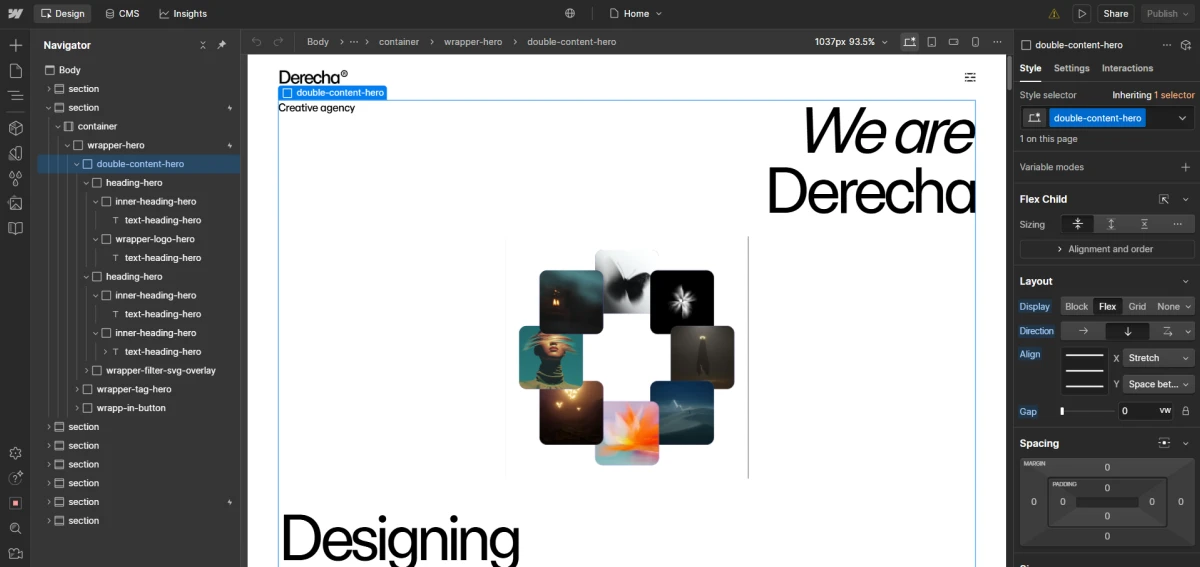
If you want to change the text in the hero section, it’s recommended to open several div blocks as shown in the image below.
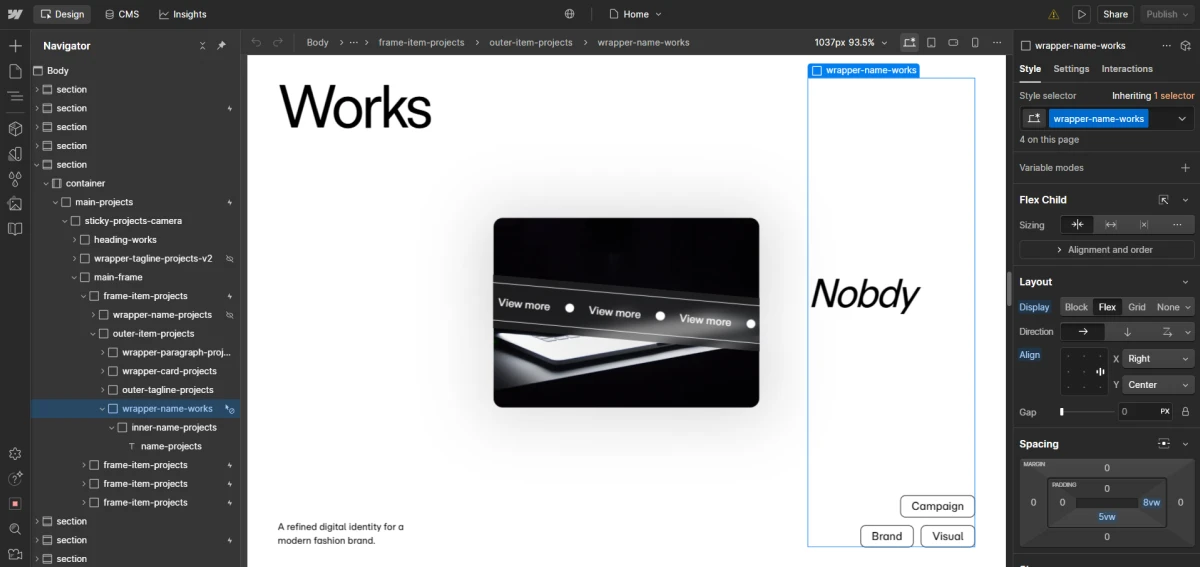
And when you want to change the project names in the project section, you should refer to the image below to see the location of those texts.
  // =========================================
// FOOTER SECTION — STANDALONE ANIMATIONS
// =========================================
(function () {
  const footerTrigger = document.querySelector(".wrapper-footer");
  if (!footerTrigger) return;

  // ----------------------------
  // FOOTER TITLE (Blur + Random Chars)
  // ----------------------------
  const footerTitles = document.querySelectorAll(".tittle-link-footer");
  footerTitles.forEach(el => {
    el.style.whiteSpace = "pre";
    const split = new SplitText(el, { type: "chars" });

    gsap.set(split.chars, {
      opacity: 0,
      filter: "blur(10px)",
      yPercent: 20
    });

    const animateTitle = () => {
      gsap.to(split.chars, {
        opacity: 1,
        filter: "blur(0px)",
        yPercent: 0,
        duration: 1.4,
        ease: "power3.out",
        stagger: { each: 0.05, from: "random" }
      });
    };

    ScrollTrigger.create({
      trigger: footerTrigger,
      start: "top 75%",
      once: true,
      onEnter: animateTitle,
      markers: false
    });
  });


  // ===================================================
  // FOOTER UTILITIES LINKS (Flicker + Random Chars)
  // ===================================================
  const footerUtilities = document.querySelectorAll(".text-link-utilities");
  footerUtilities.forEach(el => {
    el.style.whiteSpace = "pre";
    const split = new SplitText(el, { type: "chars" });

    gsap.set(split.chars, {
      opacity: 0,
    });

    const animateFlicker = () => {
      const tl = gsap.timeline();
      tl.to(split.chars, {
        opacity: 1,
        duration: 0.3,
        stagger: { each: 0.03, from: "random" },
        ease: "power1.out"
      })
      // efek "berkedip"
      .to(split.chars, {
        opacity: 0.4,
        duration: 0.1,
        stagger: { each: 0.02, from: "random" }
      })
      .to(split.chars, {
        opacity: 1,
        duration: 0.3,
        stagger: { each: 0.02, from: "random" }
      });
    };

    ScrollTrigger.create({
      trigger: footerTrigger,
      start: "top 55%",
      once: true,
      onEnter: animateFlicker,
      markers: false
    });
  });


  // ===================================================
  // FOOTER SECTION LINKS (Flicker + Random Chars)
  // ===================================================
  const footerSections = document.querySelectorAll(".text-link-section");
  footerSections.forEach(el => {
    el.style.whiteSpace = "pre";
    const split = new SplitText(el, { type: "chars" });

    gsap.set(split.chars, {
      opacity: 0,
    });

    const animateFlicker = () => {
      const tl = gsap.timeline();
      tl.to(split.chars, {
        opacity: 1,
        duration: 0.3,
        stagger: { each: 0.03, from: "random" },
        ease: "power1.out"
      })
      .to(split.chars, {
        opacity: 0.4,
        duration: 0.1,
        stagger: { each: 0.02, from: "random" }
      })
      .to(split.chars, {
        opacity: 1,
        duration: 0.3,
        stagger: { each: 0.02, from: "random" }
      });
    };

    ScrollTrigger.create({
      trigger: footerTrigger,
      start: "top 55%",
      once: true,
      onEnter: animateFlicker,
      markers: false
    });
  });

})();


  // =========================================
// FOOTER LINK HOVER FLICKER EFFECT
// =========================================
(function () {
  const hoverLinks = document.querySelectorAll(
    ".text-link-section, .text-link-utilities"
  );

  hoverLinks.forEach(link => {
    const split = new SplitText(link, { type: "chars" });

    gsap.set(split.chars, { opacity: 1 });

    function flickerEffect() {
      const tl = gsap.timeline({ defaults: { ease: "none" } });
      tl.to(split.chars, {
        opacity: 0.4,
        duration: 0.1,
        stagger: { each: 0.015, from: "random" }
      })
      .to(split.chars, {
        opacity: 1,
        duration: 0.15,
        stagger: { each: 0.02, from: "random" }
      });
    }

    link.addEventListener("mouseenter", flickerEffect);
  });
})();